Paramètres
 Livraison rapide
 Livraison gratuite
 Incoterms
 Types de paiement


 Produit marketplace

Référence fabricant SC1631
RASPBERRY PI PICO 2 RP2350
Raspberry Pi

Microcontrollers Raspberry Pi MCU
Embassy is a modern async/await framework for embedded Rust that enables concurrent programming on microcontrollers without requiring a traditional real-time operating system (RTOS) like FreeRTOS. Unlike the bare-metal approach we've been using with rp235x-hal, Embassy provides higher-level abstractions for common embedded tasks: asynchronous I/O, timers, USB, and networking.
In this tutorial, we'll create a very simple button-controlled blinking LED program using Embassy's async functions and task spawning, demonstrating how async/await syntax allows you to write concurrent code that appears sequential while the executor efficiently switches between tasks, yielding the processor when waiting for events like button presses or timer expirations.
Note that all code for this series can be found in this GitHub repository.
Embassy is a collection of frameworks and libraries for embedded Rust that provides an async/await runtime and hardware abstraction layers designed specifically for microcontrollers. At its core, Embassy uses Rust's native async/await syntax to enable cooperative multitasking, which allows you to write code that handles multiple concurrent operations (like monitoring buttons, blinking LEDs, and managing USB) without the memory overhead and complexity of a traditional RTOS or manual interrupt handling.
Embassy abstracts away many low-level details we've been managing manually (e.g., interrupt setup, peripheral configuration, and resource sharing), making it easier to build complex embedded applications while maintaining the zero-cost abstractions and memory safety that make Rust attractive for embedded development. The async approach means tasks can "await" events like GPIO pin changes or timer expirations, automatically yielding the processor to other tasks instead of blocking, resulting in more efficient resource usage and more readable code compared to traditional callback-based or polling architectures.
The framework consists of modular components you can mix and match. Let’s look at some of the most popular ones.
These replace the bare-metal HALs we've been using (like rp235x-hal) with async-first abstractions that work seamlessly with Embassy's executor.
For this series, you will need the following components:
Connect the hardware as follows on your breadboard:
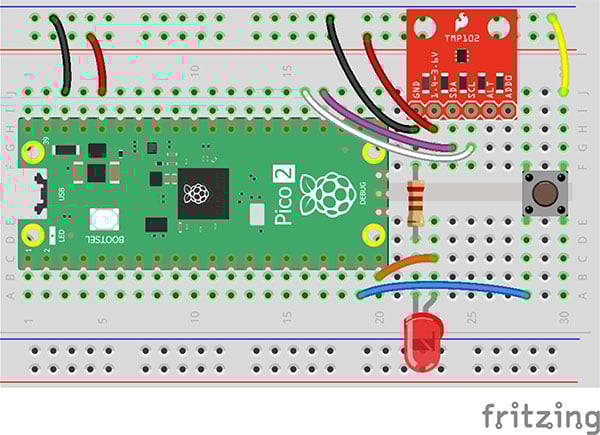
We will be using the LED and button for this tutorial. You will not need to use the TMP102 breakout board.
Start by copying the blinky project to use as a template. Navigate to your workspace directory and copy the entire usb-serial project:
cd workspace/apps
cp -r blinky timer-interrupt
cd timer-interrupt
If a target/ directory exists from previous builds, you can delete it to start fresh (though Cargo will handle rebuilding automatically):
rm -rf target
Your project directory structure should be as follows:
apps/embassy-demo/
    ├── .cargo/
    │   └── config.toml
    ├── src/
    │   └── main.rs
    ├── Cargo.toml
    └── memory.x
This follows the same basic structure as our previous embedded applications. We’ll keep .cargo/config.toml and memory.x the same (as the ones used in blinky), as they configure the embedded project for us and offer a memory map for the RP2350. However, we'll be making significant changes to the dependencies in Cargo.toml and completely rewriting main.rs to use Embassy's async/await patterns instead of bare-metal peripheral access.
Update Cargo.toml as follows. We replaced the bare-metal HAL with Embassy's ecosystem of crates.
[package]
name = "embassy-demo"
version = "0.1.0"
edition = "2024"

[dependencies]
embassy-executor = { version = "0.9.0", features = ["arch-cortex-m", "executor-thread"] }
embassy-futures = "0.1.2"
embassy-time = "0.5.0"
embassy-rp = { version = "0.8.0", features = ["time-driver", "critical-section-impl", "rp235xa"] }
embassy-usb = "0.5.1"
embassy-usb-logger = "0.5.1"
embassy-sync = "0.7.2"

log = "0.4"

cortex-m = "0.7.7"
cortex-m-rt = "0.7.5"

panic-probe = { version = "1.0.0" }

[profile.dev]

[profile.release]
opt-level = "s"
lto = true
codegen-units = 1
strip = true
We remove rp235x-hal and embedded-hal entirely, replacing them with embassy-rp (version 0.8.0) configured with features time-driver for timer support, critical-section-impl for interrupt-safe synchronization, and rp235xa to target the RP2350A variant on the Pico 2.
We add embassy-executor with arch-cortex-m for Cortex-M processor optimizations and executor-thread to run cooperative tasks, embassy-futures for async utilities like joining multiple futures, and embassy-time for async delays and timers.
For USB logging, we include embassy-usb and embassy-usb-logger along with the standard log crate that provides the logging interface. We also add embassy-sync for inter-task communication primitives like signals and mutexes.
The cortex-m and cortex-m-rt crates remain for low-level processor support, and we keep panic-probe for panic handling. This collection of Embassy crates provides a complete async runtime with hardware abstraction, replacing the manual peripheral management we've been doing throughout the series with higher-level, async-first abstractions.
Our code looks much different, as we’re now relying on Embassy to handle the low-level details for us.
#![no_std]
#![no_main]

// Embassy: HAL imports
use embassy_rp::bind_interrupts;
use embassy_rp::gpio;
use embassy_rp::peripherals::USB;
use embassy_rp::usb::{Driver, InterruptHandler};

// Embassy: main executor
use embassy_executor::Spawner;

// Embassy: futures
use embassy_futures::join::join_array;

// Embassy: timer
use embassy_time::Timer;

// Embassy: sync
use embassy_sync::blocking_mutex::raw::CriticalSectionRawMutex;
use embassy_sync::signal::Signal;

// Let panic_probe handle our panic routine
use panic_probe as _;

// Create signal handle
static SIGNAL_BLINK: Signal<CriticalSectionRawMutex, bool> = Signal::new();

// Macro to bind USB interrupt handler
bind_interrupts!(struct Irqs {
    USBCTRL_IRQ => InterruptHandler<USB>;
});

// Task: handle USB logging
#[embassy_executor::task]
async fn logger_task(driver: Driver<'static, USB>) {
    embassy_usb_logger::run!(1024, log::LevelFilter::Debug, driver);
}

// Handle button presses in main task
async fn monitor_button(mut pin: gpio::Input<'_>, id: &str) {
    let mut state = false;
    loop {
        // Yield waiting for button press
        pin.wait_for_low().await;
        log::info!("Button {} pressed", id);

        // Toggle and send signal to blinky thread
        state = !state;
        SIGNAL_BLINK.signal(state);

        // Simple debounce
        Timer::after_millis(200).await;
        pin.wait_for_high().await;
    }
}

// Task: blink the LED if the button is pressed
#[embassy_executor::task]
async fn blink_led_task(mut pin: gpio::Output<'static>) {
    let mut enabled = false;
    loop {
        // See if signal has anything, otherwise use previous `enabled` value
        enabled = SIGNAL_BLINK.try_take().unwrap_or(enabled);

        // Only blink if `enabled` is `true`
        if enabled {
            pin.set_high();
            Timer::after_millis(250).await;
        }
        pin.set_low();
        Timer::after_millis(250).await;
    }
}

#[embassy_executor::main]
async fn main(spawner: Spawner) {
    // Initialize embassy HAL
    let p = embassy_rp::init(Default::default());

    // Initialize USB driver and task
    let usb_driver = Driver::new(p.USB, Irqs);
    let _ = spawner.spawn(logger_task(usb_driver));

    // Create a new output pin
    let led_pin = gpio::Output::new(p.PIN_15, gpio::Level::Low);

    // Spawn blink task
    spawner.spawn(blink_led_task(led_pin)).unwrap();

    // Create a new input pin with an internal pulldown
    let btn_pin = gpio::Input::new(p.PIN_14, gpio::Pull::Up);

    // Create button monitor
    let btn_fut = monitor_button(btn_pin, "Pin 14");

    // Wait for the button monitor future to complete (it never will)
    join_array([btn_fut]).await;
}
The structure of our Embassy program differs significantly from bare-metal code, starting with the imports and interrupt binding. At the top, we import Embassy-specific modules: embassy_rp for hardware access, embassy_executor::Spawner for task management, embassy_futures::join::join_array for running multiple async operations concurrently, embassy_time::Timer for delays, and synchronization primitives from embassy_sync.
The bind_interrupts! macro is unique to Embassy. It uses a special syntax to automatically connect hardware interrupt sources (like USBCTRL_IRQ) to their handlers (InterruptHandler
We also declare a global Signal<criticalsectionrawmutex,bool> named SIGNAL_BLINK for communication between tasks. Signals are Embassy's async-aware notification mechanism that allows one task to wake another when an event occurs, more efficient than the Mutex<refcell<option<T>
The program defines three functions that demonstrate Embassy's async programming model. The logger_task function is marked with #[embassy_executor::task], transforming it into a spawnable task that runs concurrently with other code. This task simply runs the USB logger using the embassy_usb_logger::run! macro.
The monitor_button function is an async function (not a full task) that lives within the main task's lifecycle, demonstrating how Embassy's HAL provides async methods like pin.wait_for_low().await that yield execution until a GPIO event occurs, completely eliminating the need for manual interrupt handlers or polling loops.
When the button is pressed, we use SIGNAL_BLINK.signal(state) to notify the LED task, then Timer::after_millis(200).await for debouncing (without blocking other tasks). The blink_led_task demonstrates checking a signal with SIGNAL_BLINK.try_take().unwrap_or(enabled) to see if the button has been pressed, enabling or disabling LED blinking based on that state.
The main function uses the #[embassy_executor::main] macro, which initializes the Embassy runtime and provides a Spawner for launching tasks. We initialize the Embassy HAL with embassy_rp::init(Default::default()), spawn the USB logger task with spawner.spawn(logger_task(usb_driver)), and spawn the LED blink task similarly.
The button monitoring happens in the main task itself using join_array([btn_fut]).await, which waits for the future to complete (it never does, so our program runs forever). A "future" is an object that represents an asynchronous operation that may not have completed yet. Think of it like a "placeholder" for a value that will be available later. When you call an async function or use .await, you're working with futures that the executor manages, pausing and resuming them as needed until the operation completes and the placeholder gets filled with the actual result.
This structure demonstrates Embassy's power: what would normally require complex interrupt handlers, global state management, and careful synchronization is expressed as simple, sequential-looking async code. The executor handles all the complexity of switching between tasks, waking them when events occur, and ensuring efficient CPU usage. When all tasks are waiting, the processor enters low-power sleep mode automatically, just like our manual wifi() calls, but managed transparently by the framework.
Build your program:
cargo build
You are welcome to check the binary size of the debug and release variants:
cargo size
cargo size --release
Convert the ELF file to a UF2 file:
picotool uf2 convert target/thumbv8m.main-none-eabihf/debug/embassy-demo -t elf firmware.uf2 -t uf2
Press and hold the BOOTSEL button on the Pico 2, plug in the USB cable to the Pico 2, and then release the BOOTSEL button. That should put your RP2350 into bootloader mode, and it should enumerate as a mass storage device on the computer.
On your host computer, navigate to workspace/apps/i2c-tmp102/, copy firmware.uf2, and paste it into the root of the RP2350 drive (should be named “RP2350” on your computer).
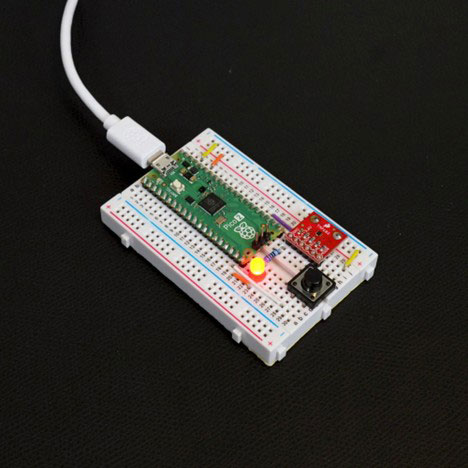
Once it copies, the board should automatically reboot. Try pressing the button to toggle the blinking LED on and off.
This concludes the Introduction to Embedded Rust series! Hopefully, at this point, you have a solid foundation for creating your own embedded Rust projects. If you would like some additional resources, I recommend checking out the following:
Simplified Embedded Rust book - I recommend the ESP Core Library edition for getting started with Rust on the ESP32.
Find the full Intro to Embedded Rust series here.